Category: google

  • Helpful numbers to save in your phone!

    I invite you to go grab your cell phone / mobile phone / home phone whatever and program the following numbers into it:

    – 1-800-555-8355 (“555 TELL” — TellMe)
    – 1-800-373-3411 (“FREE 411” — Free411)
    – 1-888-392-7563 (“EZ ASK ME” — AskMeNow – Initial signup on site required)
    – 46645 (“GOOGL” – Google SMS beta – Google via Text Messaging)

    NOTE: One or more of these numbers may be U.S.-only… sorry 😐

    For details on each service, read on…

    TELLME
    I’ve been using this service for ages, and it’s really gotten me out of some tight jams!

    Via interactive voice menus, callers can easily get weather reports, serious and entertainment news, movie info, and much more. But the butt-saving features I’ve particularly appreciated are TAXI and DRIVING DIRECTIONS. The former will connect you (free of charge) with a local cab company, and the latter gives you step-by-step spoken driving directions between any two points in the U.S. (powered by “Microsoft MapPoint Technologies”)

    Supposedly, TellMe is ad-supported, but I have yet to hear any ads on the service.

    * * *

    FREE 411
    Tired of paying $1.25 and up to your greedy mobile or landline phone company for directory assistance? Then you’ll especially love Free 411! Not only does it find residential and business phone numbers for you, it also connects you free-of-charge (even to long distance numbers!) This service is apparently ad-supported (e.g., ask for Dominos Pizza, get a 15 second ad for a competing pizza place), but I’ve never heard any ads during the 3-4 times I’ve used this service.

    Voice recognition is pretty decent, but the one time I stumped it, I was transferred to a human operator who was able to promptly get me the number I requested.

    Frankly, though, I do wonder how sustainable this is. Will enough companies really pay to have folks redirected to them? If people are asking for Smith Window Washing services, will they really be so easily swayed towards a competitor? I have my doubts. But in the meantime, I’m happy to use this very convenient free 411 service!

    * * *

    ASK ME NOW

    Need to know the capital of Wisconsin? Or find the phone number of a particular Citibank branch? Sure, if you’re near an Internet-connected computer, you could probably quickly and easily find this info yourself. But what if you’re busy or not near a computer? Yes, I have a Web browser on my Treo phone, but it’s slow, the screen is small, and it’s generally just a miserable experience trying to navigate Web sites with it.

    Well, Ask Me Now is indeed a viable alternative. You call their number, leave a message, and 1-3 minutes later, you get back text messages with the right answer. Or at least AN answer. In my minimal testing, Ask Me Now gave me the right answer to “What is the Capital of Wisconsin?” but gave me the wrong answer to “What is the phone number of the Citibank branch located on Diamond Street in San Francisco?” The person (apparently located in the Philippines) who answered my query clearly just quickly googled for the answer and didn’t bother checking on Citibank’s Web site, since the correct answer is available in the latter, not the former.

    This service costs 49 cents per query, billed to your cell phone account. Supposedly you can get free ‘automated’ answers, but it’s not clear to me what qualifies as free and not-free, even after looking on the company’s Web site.

    * * *

    GOOGLE SMS
    Another option is Google’s SMS service. Text message GOOGL (46645) to get driving directions, movie showtimes, weather reports, price comparisons, and more.

    I’ve found this service to be both wonderous and frustrating. For instance, when I asked it [What is the capitol [sic] of wisconsin?] it replied back “Did you mean CAPITAL…” and gave me an appropriate Web page… when I would have preferred for it to actually include the answer, not just a link, in the reply. Additionally, when I asked it [Phone number for Citibank on Diamond St in San Francisco CA] it replied unhelpfully: “Looking for map of [query]? Unfortunately map information is not available through Google SMS.”

    I had better luck with other queries, such as [weather 91360] and [what is the population of belgium].

    * * *

    YAHOO SMS
    Despite multiple attempts, I could not get this service to work. I kept getting an “Invalid…” message, with instructions relating to Y! Messenger, after even using the exact queries listed on this page. Bummer. Any Yahoo people out there wanna help me figure out what’s going on here? I’ve heard good things about Yahoo’s mobile offerings and perhaps there’s just something small / obvious I’m missing?
  • Google Analytics (formerly Urchin) free Web Stats is now live

    https://www.google.com/analytics/

    I learned that this was coming via this Information Week article.

    Lots of fascinating issues and implications!

    – How much of a further competitive edge will this give AdWords over other pay-per-click advertising services like Yahoo! Search Marketing?

    – Will this completely decimate small, low-cost Web Stats services like StatCounter? My gut is that it’ll make a dent, particularly amongst small to medium-sized businesses, but that for those who are looking for something very quick, easy to set up, and fast to browse, they may indeed stick with simpler solutions.

    – What will this mean for HitBox, ClickTracks, etc? Once again, I think this’ll significantly impact their share of small-to-medium-sized clients, but it’s very unlikely to rock any relationships with Fortune 500 / large firms.

    My experience with Urchin?
    I set up and used the service with a client a few months ago, and found it to offer fascinating insights and have very high potential overall, but it was frustratingly creaky (slow, a bit flakey) undoubtedly due to the high (millions of hits a month) traffic it was being asked to process for this client.

    With that said, though, I can’t wait to try this out on my blog and my other personal sites, and I will recomend it heartily to my smaller clients. Assuming Google manages to scale this decently, I can see recommending it to larger clients as well.

    Still, however, I’m skeptical that Google’s customer support will scale decently for this product. Urchin, er, Google Analytics is a very complex, frankly complicated service, and there are so many places in which users can become confused or overwhelmed. Thankfully, Google recently substantially improved their help documentation (a couple of months ago), but still…

    And hmm… perhaps Google will roll out a more limited and/or fully integrated version for BlogSpot folks at a later time?

    Anyway, I’m going to quit blathering and give this service a try now. 🙂

  • Yahoo! and Google Maps… add more common sense, please

    I don’t know about you, but the vast majority of searches I do on Google Maps and the splendiforous new Y! Maps (beta) are for directions from my apartment in San Francisco to somewhere else in the city. Here’s the sort of search I’d type in by default:

    [{my address} to 16th and valencia]

    But both Google and Yahoo! choke on this search, and choke bad. Yahoo! gives me an error message saying the address could not be found, and then nonetheless gives me directions to Valencia, Arizona. Google performs no better here; it asks me “Did you mean Valencia Road, Bromsgrove, Hereford and Worcester, B60, UK?” Suuuuuure, Google, I’m going to get in my car and drive from San Francisco to the UK. 😉

    Where’s a Common Sense module when you need one?

    For starters, how about assuming that if I don’t add on a city, state or zip code, that I’m intending to travel within my home city. On G, one can already define a default starting point. And I’d assume that, when logged in to one’s Y! account, Yahoo already knows one’s home city, too. Not to mention IP sniffing possibilities, too!

    Or even better yet, if it’s not too computationally resource intense, it’d be great if the engines could assume a 100 mile radius and prioritize by proximity. That means if I type in 123 Mission St and I’m in San Francisco, I probably mean to indicate that street in SF or nearby, not somewhere in Minnesota. Since most of us don’t have zip codes handy when we’re doing directions, it’s a lot faster and easier to type [555 myhomestreet 94112 to 123 mission st] than [555 myhomestreet 94112 to 123 mission st, san francisco, ca].

    Lastly, I understand that sometimes requests ARE ambiguous (maybe I meant mission street in a nearby city, not SF, despite failing to specify it)… so the services should always preface the results on such ambiguous requests with something like this:\

    NOTE: We assumed you’re traveling to 123 mission street in San Francisco, CA. If this isn’t right, please retype your request and specify the city and state.

    And heck, for that matter, why can’t I type [1531 19th ave to 99 valencia st] and have it assume I mean San Francisco (based upon my signin, my past searches, my IP address, whatever)?

    Am I on target here, or would such assumption-makings on the part of the engines be more trouble than they’re worth?

  • $1 will cure the Blogspot splog problem (and related problems)

    THE PROBLEM
    As Chris Pirillo and others have noted, doing a search on practically anything nowadays returns a deluge of spam blogs, or “splogs,” that are comprised of a bunch of randomly scraped-together sentences automatically stolen from around the Web. Typically, the sploggers create these blogspot blogs just so they can slap AdSense ads on them and earn cash from unwitting surfers who land there, see that all the content is crap, and then get away by clicking on one of the ads on the page.

    Sounds stupid? It is. But sadly it’s actually lucrative for the sploggers. And Google’s caught in the middle because — while, yes, they’re earning money as well out of the deal — their search index is becoming less and less useful… and that can undoubtedly hurt the company’s long-term viability. Say what you will about Google, but they are nothing if not forward thinking… so this is a problem that they are certainly seriously tackling in the background.

    THE SOLUTION
    But I have an idea that’d solve the issue faster. It’s not entirely ‘democratic.’ It also risks some ‘friendly fire’. And initially, it’ll be a major pain in the ass for Google and a minor pain in the ass for anyone wanting to set up a blog. But hear me out… 🙂

    Google should require a $1 credit card, ACH bank payment, or paper check payment from any blogger who wants his or her blog to be indexed.

    But note that…
    – Anyone could still create a blog for free.
    If you wanted to have a blog to communicate with your friends or family or workgroup or whatever, no sweat. You’d just give ’em the URL, let them subscribe to your RSS feed, etc., no payment required.

    – Google would create a special subdomain for the paid blogs.
    blogspotgold.com or whatnot… so that other search engines could easily filter out anything in the blogspot domain.

    – Google would allow any current blogspot user to ‘upgrade’ for $1 and would automatically redirect their URL permanently.

    WHY THIS’D WORK
    – It would likely no longer be economically feasible for spammers to create 10,000 disposable splogs.
    – Even if the economics worked out, Google could limit the number of blogs created per credit card number or bank account.
    – Google’s creating its own payment processing solution anyway, so they’ll soon have the payments part covered.

    WHAT WILL HAMPER THIS SOLUTION
    – Sploggers could use stolen credit cards, though I think it’d be difficult to do this in bulk.
    – But most critically, there’s the frustrating issue that even a $1 payment could end up publicly silencing voices that should be heard.

    MORE ABOUT THE SILENCING-VOICES PROBLEM
    While I’m all for accountability and taking personal responsibility for one’s communications, I also recognize that there are instances in which folks desire — and often should be accorded — anonymity.

    For instance, what about Chinese dissidents who may want to blog about their feelings and experiences or even blog about upcoming protests? Is it inconceivable that the Chinese government could pressure Google into handing over identity information gleaned from a dissident’s $1 blogspot payment? Even if Google takes pains to sincerely insist that it will *NEVER* do such a thing, will everyone trust this promise? And what about whistleblowers?

    Or what about those people — particularly in non-industrialized countries — who may not have a bank account or credit card but still want to blog?

    A POSSIBLE SOLUTION TO THE SILENCED-VOICES PROBLEM
    Perhaps, instead of denying indexing to all non-paid blogs, Google could simply — upon request — pre-screen all such blogs for indexing consideration. For instance, something like the following:
    1) Person sets up free blog and blogs a minimum number of substantive (non-sploggy) posts over a minimum period of time.
    2) They then submit this blog for indexing consideration to Google.
    3) If Google determines it to be non-sploggy, they then elevate it to blogspotgold, and provide a free redirect from the old URL.

    Admittedly, though, sploggers could retaliate in this context by submitting bazillions of obvious-crap blogs just to clog up the reviewing queue. However, if it were impossible to submit a blog for consideration until it had been around, say, 3 months or 6 months… that would make it harder to do a mass-submit “DOS” [denial of service style] attack. Spammers are not patient people.

    * * *

    So I’m curious… what do you think about all of this?
    1) Would a $1 payment really prevent most or even all splog from getting into the indexes of Google, Y!, and all other major players?
    2) Would there be bad ‘collateral damage’… or could this be reasonably minimized by the ideas I’ve specified or through other means?
    3) Know of any anti-splog options that are better than my $1 idea? (hint: capchas alone aren’t the answer)

    * * *

    UPDATE at 9:00PM PST, 10/16/2005:
    People have pointed out to me that children and young teens typically don’t have credit cards or even bank accounts, and that it seems unfair to single them out for a waiting period. So here are some other ideas (with the first two stolen from current Gmail policies :D)

    – Get a blogspotgold account via text message.
    True, this requires a phone… or a friend’s phone.

    – Get a blogspotgold account via invite from current member.
    Allow each current member to hand out up to 10 tokens a month, and if more than 2 of them are used to create splogs, then don’t give that member any more tokens for a year.

    – Distribute blogspotgold tokens via schools (administrators, teachers, whatever)

    * * *

    UPDATE, 10/18/2005 at 1:45AM PST:
    Ah, Google responds to the outcry! I had no doubt that they’d be taking all of this seriously (I know that the Blogger folks are sincerely passionate about blogging!), but it’s nice to see their public acknowledgment of the problem nonetheless.

    Also, the prolific geek, Chris Pirillo (of Lockergnome fame) has proposed his own top ten list of Blogspot anti-splog solutions.

  • Bloglines, Newzcrawler… and the new Google Reader

    A few weeks ago, I already started transitioning all of my feeds off of Bloglines. Why?
    – It’s slow.
    – It’s down too often.
    – Reorganizing feeds (moving them to different folders, etc.) is worse than being stuck in a closet with Vanna White. Night after night after night after night.
    – It’s similarly painful to mark just a few articles in a feed as read or unread.

    I’ve moved over to Newzcrawler, a stellar newsreader app for Windows. Beyond just tons of cool power features, it also lets me pretty easily sync my feeds between my desktop and laptop using an external FTP site (okay, geeky, I know).

    * * *

    With that said, I’ve still been hoping to see some vast improvements in the online-reader front. Rojo seems to be getting better. And I’ve heard rumblings over other cool services as well. When I learned today that Google had entered this space, I was extremely excited. Please, I thought, give us another Gmail. Or Maps! 😀 If not for me, at least for my less-geeky friends whom I’m dying to get into feed reading.

    So far, alas, I’m rather disappointed in the Google Reader. I know it’ll get better, but for now, Googlers…

    1) It’s too cluttered and overwhelming.
    Hide some stuff. I know that sounds counterintuitive, but blog text blends into all the other text and I find it just tiring to spend more than a few minutes in Reader.

    2) No mouseovers?!

    3) Ambiguities
    Is “Read items” a description or an action? Okay, admittedly this is rather a nitpick, but it is a top-line link ;-).

    4) Search what?!
    When I see a search box at the top of the page, I expect to be able to search the content-in-context. In other words, if I’m in my Gmail account, I expect to search my mail. If I’m in Reader, I expect to search for a string in my read and/or unread feed items. From an expected user-action standpoint, what’s likely to be more common: adding new feeds, or working with the feeds one already has?

    5) Save me from overload!
    There’s no way to mark an entire feed as read. Or group of feeds.

    6) Why the weird quasi-breadcrumbs in center focus?!
    Why do I want to see “New Subscription” “New Subscription” article article article… Just show me new articles. If I want to see what I’m subscribed to, I’ll go to the Your Subscriptions tab! 🙂

    * * *

    Other quick suggestions/observations:
    – Add a space in “Subscriptions(#)” to make it “Subscriptions (#)”
    – Include a shortcut key to go to the pulldown menus. Actually, quit using HTML-style pulldown menus as action-triggers. It’s not good UI, IMHO, and it’s confusing when more than one says “More actions…” (plus with more than one on a page, that sort of makes it hard to use a keyboard shortcut)
    – Allow for the multi-selection (and from there, tagging) of feeds.
    – Include a feedback link directly on the Reader page.
    – Enable us to see ALL articles from a given feed in one fell swoop (ala Bloglines)
    – Let us easily sort, reposition, edit, and delete labels and sets of labels.
    – BUG: I unsubscribed from a feed, it’s outta my list, but I’m still seeing items for it.
    – Gimme feed icons, please! When I have 200+ feeds, it’s how I can most easily spot some of my favs 🙂
    – Dim links if they’re not applicable (e.g., dim the Page Up link if I’m already at the top)
    – I tagged an entry. How do I search for it by tag now? (I only see how I can filter feed tags)

    * * *

    Okay, let me be a LITTLE less of a jerk here and note what I *DO* like about Reader:
    – Keyboard shortcuts! 🙂
    – Ease of adding new feeds (by keyword, by title, by URL… very flexible!)
    – Nice how the filter narrows as I type! (but it’d be even nicer if ESC cleared it)
    – Pretty fast (excepting the short time earlier today when it was first released)

    * * *

    Anyway, I’ll keep my fingers crossed that Google rapidly works on this beta, giving it top resources… rotating in seasoned PMs / APMs, providing needed equipment for scalability and so on. For now, though, I’ll happily stick with Newzcrawler, and — admittedly grudgingly — suggest that my newbie friends start off with Bloglines for now.

  • Google RSS ads: Either foiled by anti-ad bastards or…?

    I have run a single Google AdSense ad in each entry in my full-text RSS feed since May of this year. I’m apparently not allowed to discuss clickthru rates, so let me just say this:

    Despite getting a rather decent amount of traffic for a personal blog, I cannot buy a pack of bubblegum with the revenues I’ve earned from ads in my RSS feed. In fact, I’d be surprised if I could buy a single gumball.

    This comes as rather a surprise me, not to mention a disappointment.

    The ads were unobtrusive but still noticeable. And more importantly, I found them to be generally pretty relevant (nicely targeted) as well.

    Since I’ve now removed the ads from my feed, I am free to talk about them without worrying about incenting clicks and jeopardizing my account. So a few questions come to mind:

    1) If the ads had been less subtle, would more people have clicked?
    2) Is it a demographic thing (people reading RSS feed = geeks = non-ad-clickers)?
    3) Was the presence of these ads annoying enough to some to get them to unsubscribe? (Probably not, since I don’t show any drop in subscription or clickthru rates)

    I recall reading on the Web that many others were having similar bad luck with their AdSense feeds for RSS. I wonder if anyone has actually had GOOD luck with these ads.

  • GoogleTV – undoubtedly a boon for consumers, but…

    GoogleTV is coming.

    In this role, you will provide leadership on product vision and execution of projects that enable using Google’s search and advertising technologies to enhance users? Television viewing experience. […] You will identify key market trends that are shaping user behavior when watching Television. These include but not limited to the intersection of Internet and Television technologies, Video-On-Demand, Personal Video Recorders and emergence of next generation set-top-boxes with IP connectivity. You will then identify areas where use of Google’s search and advertising technology can enhance this user experience and define appropriate products to deliver these user benefits. […]

    Job posting placed online by Google this morning

    UPDATE 9/23/05:
    Google has removed the job listing from their site.

    * * *

    Is Tivo quaking in their boots? And will Hollywood embrace or fear the upcoming empowerment of consumers?

    Historically, even when it’s been in the entertainment industry’s long-term best interests, they’ve staunchly protested many technological advancements. VCRs, Tivo… despite the reality of occasional ad-skipping, these tools have undoubtedly increased viewership (and with videocassettes / DVDs, sales) by an order of magnitude.

    * * *

    What will the Google tools offer consumers, advertisers and the entertainment folks? And what will be the response of privacy advocates to the advertisement targeting?

    Benefits of TV ad targeting
    I’m guessing that Google will ultimately succeed in matching (unnamed) user viewer behavior — individually or in the small-aggregate — to smart-targeted ads, and I think that’s great. I’m personally in favor of the new world entertainment order. If I’m watching a nature show, I’d rather be pitched an ad for eco-friendly detergent than an SUV. And more specifically, if I watch a lot of nature shows, then even when I’m watching non-green stuff, I should be shown ads that appeal to my environmental sensibilities.

    Targeting by show, not by person?
    In terms of privacy, I do hope (and expect) that Google won’t be attaching viewing profiles to personally identifying information (e.g., they won’t know that Adam Lasnik is a liberal environmental softie). That’s how their Gmail works, at least; I believe they actually target per e-mail not to a specific ongoing profile, much less a particular named person.

    * * *

    Ad targeting challenges and concerns
    So many fascinating issues! Even for those of us who aren’t big TV watchers, this heralds an era that’s worth watching. Particularly in the privacy (and perceived privacy) arena… worthy questions abound; should Google profile users long-term? How will it deal with multiple family members? And unlike with Web surfing that generally features one person typing/viewing at a time, TV can often be a family matter. If Dad loves golf and Mom loves gospel music and they’re watching a crime drama together, could viewer profiling work in this messy context? What about inappropriate juxtapositions (ads for funeral homes during coverage of Katrina)? Google takes care to avoid inappropriate and uncomfortable content/ad ties in its current properties, but the visual medium can be so much more powerful and searing…

    * * *

    Can Google play nice, even with dinosaurs?
    And then there are the questions about Google’s current and upcoming relationship with content providers and advertisers. We already know that Google’s relationship with at least some book associations is strained at best (unfairly so, IMHO). And I’ve read quotes from entertainment moguls as being a bit wary of Google in some contexts…

    Hopefully this time Google will more strongly endeavor to engage in proactive, open, and reassuring conversations with all affected parties… even those who are governed more by fear than by consumer interests.

    RELATED LINKS:
    – An index of postings about Google in this blog.
    – An index of general Geekdom postings in this blog.
    – The full-text RSS feed for this entire blog.

    Want to get e-mailed whenever BLADAM is updated?
    Type your e-mail address into the box at top left. Full feed or summaries, but no spam! 🙂

  • Google’s moving in the wrong direction: It’s the message, not the medium

    There’d been talk of it for a while… might do, could do, should do.

    But Google’s finally gone and done it with blogsearch. After being tipped off by John Batelle’s blog, I learned that Google has added a “blog search” feature that lets users search blogger blogs and other blogs as well in near-real-time.

    I’ve already spotted reviews of the service’s speed and completeness and related basics… but I’m concerned with something a bit deeper.

    At best, I think the new Google Blogsearch tool is moderately interesting and helpful. At worst, however, I think this seriously undermines the ideals of content over form.

    I don’t think I’ve come out and said it so bluntly before, but I’ve been meaning to:

    No one ever been fired for blogging. People admire Robert Scoble for his communications, not his blog. Washingtonniene got herself in hot water (or a hot book deal, depending on your perspective) due to repeatedly opening her legs in front of influential congresscritters and blabbing about it to lots of people.

    I am a writer, a dancer, a community evangelist, a geek, but I’m NOT A BLOGGER.

    I happen to use a tool (Movable Type) that structures my writing in reverse chronological order, ads some neato features and frills, and at the end of the day, the output is in the form of and called a blog.

    I also use the telephone. Does that make me a telephoner?

    I’ve spoken before large groups using a microphone before. Does that make me a microphoner?

    The tools doth not make the message… nor the worth of that message. They may enable it, amplify it… but the medium is not the message. I take responsibility and credit for what I communicate — in ANY form — as should others.

    * * *

    So what’s my point? Is it all semantics? No, no, and no.

    Why does the Googlebot and the Google index like blogs? Because they are often refreshed frequently and often have content that people are searching on.

    Why are blogs useful to many people? Because they are often refreshed frequently and they often have content that folks want to read.

    The distinguishing factor isn’t the structure, it’s the message, or at least the frequency of message output.

    But, I hear you arguing, if I’m looking for articles about the beauty of Foo, I’m more apt to find interesting / informative / entertaining stuff in blogs, as opposed to from a general Google search, where I’ll find “Buy Foo here!” and “foo foo more stuff that looks like foo but isn’t!” and “A directory of foos linking to foos that link to more foo directories.”

    Ah, spam, glorious spam. But to this I say… the problem is in the message (or lack of relevant message) and/or the funneling and discovery of the message, not the medium that message has been stamped with. And besides, as most folks have ruefully learned lately, there’s a lot of spam in “blogs” or things that are blogs in structure only.

    * * *

    So what does separating out blogs accomplish?

    Highlighting the little guy, the fella who blogs his heart out after he gets home from his day job? Not necessarily. Lots of the most popular blogs are part of blog ’empires’ nowadays, with people literally paid by the entry. Basically news sites. Mega-editorial sites.

    Does filtering in/out blogs accentuate opinions? News items? Photos? Likely no moreso than an intelligent, optimized search of the Web on the whole.

    Perhaps, some would retort, it provides an easy way for folks to find venues for community online interaction via blog comments. But this is an especially flawed argument; after all, a great many blogs have disabled their comments, and on the flip side, there are tons of forums on the Web that feature robust conversations.

    And at the end of the day, what exactly is a blog anyway? Is Slashdot a blog? Or a forum? How about CNet? Or Metafilter?

    If I add an RSS feed to a Web page or a wiki, does this make it a blog? How about comments?

    Or the reverse: what if a “blog” doesn’t have an RSS feed and doesn’t support comments or trackbacks; is it really a blog?

    What if it’s essentially a newsletter sponsored by a megacorp (e.g., a McDonald’s “Blog”)? Is that more bloggy than a Web site by Auntie Jo with FrontPage-pasted daily updates?

    * * *

    Given all this ambiguity and the questionable use of separating out blogs, I believe that Google and other search engines would be better off improving how they interpret searcher intent. So when folks search for “foo facts” or “foo reviews” or “foo opinions” or “buy foo” or “foo sex” they’d get search results relevant to the TYPE of or FOCUS on foo that they were hoping for. Increased personalization will (or at least should) do a ton to improve this as well.

    So, too, could Google simply add better tools to more finely filter messages or sites… regardless of whether they’re wikis, forums, blogs, or something else entirely. A “freshness” slider (written or edited recently vs. a long time ago), presence of comments, multiple authors, has RSS/Atom feed, etc.

    I fear that Google — and ultimately other search engines that follow in their lead — will have taken the easy way out. Maybe they’re hoping that this’ll at least be a useful stopgap measure until they improve their algorithms and tools enough to filter upon searcher intent… but I’m resigned to the reality that — once initiated — a (perceived)-blog-segregation is unlikely to be undone. And that’s a bummer for bloggers, pseudo-bloggers, and everyone else.

  • A review of Google Talk: Not yet revolutionary or compelling

    As hyped in breathless news articles over the last few days, Google came out with their own IM (instant messaging) client this evening, Google Talk.

    VERDICT: Clean, uncluttered, intuitive, and rather unexciting in its current version.

    To be frank, I was (somewhat unfairly) disappointed with GTalk. Granted, it’s just v1 of a public beta, so I shouldn’t be so greedy, but… unlike with Gmail, I didn’t see anything that made me go WOW!

    Great voice quality? Sure, but Skype has already got that (and also already has a humungous userbase).

    Ad-free (at least for now)? Yes, but so is Trillian, the IM app I already use and love. Incidentally, the Pro version of Trillian (a very worthwhile buy, IMHO), along with other clients, can connect to the Google network. This is because Google is smartly and unselfishly running their chat service on the open source Jabber platform.

    And indeed, I’m having trouble seeing how Gtalk will gain traction for the time being. AIM, Yahoo, and MSN users really have little incentive to switch, especially since GTalk doesn’t (at least yet) interoperate with the big 3. Trillian users… I can’t see any reason why they’d switch, either. Skype folks? As noted above, I simply can’t forsee any defections.


    Let me sprinkle in a few positive notes, though:

    You can run an ’embedded’ form of GTalk within the Google Desktop sidebar. Exit GD, wait a few moments, then restart it. Click the little down-arrow at the top right, select ADD/REMOVE PANELS, and check off Google Talk.

    Google Talk replaces the current Gmail Notifier, and that’s handy.

    GTalk scans your existing GMail address book, and lets you easily find and invite others to GTalk.

    Oh, and there’s a puzzling little easter egg in the About dialog box. Click on the ABOUT link in GTalk (or the sidebar component), and you’ll notice this in light text towards the bottom:

    play 23 21 13 16 21 19 . 7 1 13 5

    Anyone wanna guess what the significance of that is? 23, undoubtedly, stands for the 23rd of August — the release day, but the rest…? Maybe it’s something that, if you can solve it, you get a Google job offer? Get cracking! 😀


    Anyway, I’m guessing (and hoping) that Googlers have a trick or two up their sleeve with regards to this new product.

    What are your thoughts on this?

  • Google Desktop review — check out the cool new beta version!

    Introduction

    What is Google Desktop (“GD”)?
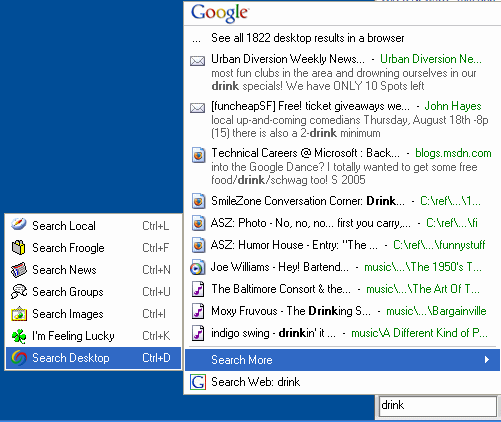
    Google Desktop (formerly known as Google Desktop Search or “GDS”) is free program from Google that enables you to search for data on your computer much like you use Google to search the Web. You can look for and open e-mails, photos, music files, PDFs, and lots of other good stuff. No ads are shown. Below you can see a screenshot of me searching for “drink.”

    google desktop search hyper results

    How to get GD

    Go to http://desktop.google.com/ and follow the very simple instructions. Note that you have a choice of the latest version (2.0 beta — a version still in testing, described in the rest of this post, or 1.0 final).

    A brief background on my love / not-so-love relationship with GD
    I had just about given up on GD. Initially impressed and pleased with the product, I was losing love for GD as I became more seduced by the find-as-you-type capability from competitors such as X1 and MSN Desktop Search. Sometime straying, I would somewhat grudgingly come back to GD, appreciative of the handy contextual Web snippets but wishing there was a product that combined the richness of this with find-as-you-type speediness.

    Just in time… Google Desktop Search v2 (GD2) is that charming fleet-footed if still a bit gawky new friend.

    For those too lazy or impatient to read through my entire review, I’ll summarize with this…
    Google Desktop offers a delightful mix of usefulness and fun. For those who have humungous amounts of data and need to finely drill down by multiple fields, X1 and Copernic may remain more favorable options. But for the vast majority of geeks and non-geeks alike, GD’s speed, light footprint, and currently-entertaining-if-not-yet-essential non-search extras will likely be enough to earn a place on their desktop.

    Key improvements

    GD2 is a significant step above GDS. Here’s a sampling of what’s new and improved:

    • Find-as-you-type (search results quickly pop up as you type each letter, narrowing the search with each additional letter)
    • Search Gmail and network drives.
    • Search Outlook items like tasks, notes, appointments. Search directly from the Outlook interface, too.
    • A nifty sidebar (discussed in detail below) with an open API!
    • Items moved (even from an IMAP to non-IMAP folder) are now handled more effectively by GD.

    Installation and pre-installation

    Installation of GD is easy and pretty painless. On my reasonably beefy P4, the download took a few seconds and the entire install process took under 3 minutes. This, of course, doesn’t include indexing time, which (though I didn’t time it) seemed only a few hours for my drive with 100+ megs of stuff AND my Gmail account.

    Google’s GD privacy policy, thankfully written in English rather than legalese, is similarly straightforward. Highlights:

    • The contents of your computer aren’t shared with Google or other folks without your explicit permission.
    • A limited amount of non-personal info is sent to Google to help in troubleshooting, software development, and content personalization. You can opt out of this if you want.
    • You have control over what GD indexes.
    • You can uninstall GD if you like (duh!).

    Google walks you through some basic configuration options and then, voila, you’re done. Well, almost done. You have to go read a book, ride a bike, or do something away from your computer (ack!) for a while if you want Google to actually index your stuff. And hey, make sure your (supported) e-mail program is open in the meantime, or GD won’t be able to index your mail.

    The nifty GD Sidebar

    The sidebar consists of the following components, any of which may be either not shown or minimized. Items in green are ones I personally find particularly cool.

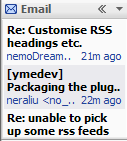
    • Email
      This only supports Gmail for now. It shows a bit of each recent email’s title, AUTHOR, and time of receipt ([x] minutes ago).
    • News
      This shows a number (your choice) of headlines from Google News… article title, source, and time of posting ([x] minutes ago). This is very frequently updated and you can actually see new items gradually push down older items in a nice gradual sliding effect (which I suppose some could find distracting).
    • Web Clips
      This presents “feeds” to you either from sites you’ve frequently visited and/or from sites you specify. For instance, after I visited Wired.com, this sidebar component started including headlines from Wired. When I visited a friend’s blog, it started including headlines from her blog. You get the idea.
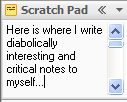
    • Scratch Pad
      Pretty much like what it sounds like. Write plain-text notes here and they’ll stay here :-).
    • Photos
      GD crawls through your photo collection (which you can bound by specific limits) and displays a mini-slideshow here… a new photo fades in every 15 seconds by default. Clicking on the photo takes you to a list of recently shown photos. Clicking on one of those photos brings up the full-sized version. In addition to grabbing photos from your hard drive, this panel item also optionally shows photos from sites you visit.
    • What’s Hot
      I’m not exactly sure how this works, but it seems like some sort of Zeitgeist / Blogpulse type of thing highlighting the Web pages that have recently been popular. I find the stuff on www.spurl.net to be more comprehensive and entertaining.
    • Quick View
      This panel item lists items or pages you’ve recently accessed or viewed. Sounds great in theory, but I’ve found it pretty useless in practice, since it tends to show files that my computer accesses frequently (preference files, etc.), or files that I regularly — but indirectly — access on the ‘net.
    • Stocks
      Add stocks or stock indices, see the numbers. Pretty basic.
    • Weather
      Add a city, see the highs, lows, and so on. Pulls from the same weather data you see if you type weather [zipcode] into Google… that is to say, not terribly accurate data, IMHO.

    Information from each sidebar can also be viewed in a larger panel; for instance, you can click on the << mark on the title bar of News, and you'll get a larger (attached) window showing news items. Click on one of those news items and you'll see a snippet. Click on the title in the snippet, and you'll be brought to the original Web page. Whew! Sounds complicated, but it's all rather intuitive. You can also easily drag-and-drop resize, and minimize sidebar components. Most importantly, I see this sidebar as just a glimpse of stuff to come. I have no doubt that people will create and share their own useful or fun sidebar items via GD plugins pretty quickly, especially given that the sidebar — as GD on the whole — has an API that independent developers can write for.

    Google Desktop Search stocks sidebar Google Desktop Search email sidebar Google Desktop Search photos sidebar Google Desktop Search scratch pad sidebar
    Google Desktop Search quick view sidebar Google Desktop Search news sidebar Google Desktop Search web clips sidebar Google Desktop Search weather sidebar

    Google Desktop Search news sidebar expanded

    Configurability and options
    GD is reasonably configurable. You can set, among other things…

    • What types of data you want indexed (email, chats, Web history, etc.)
    • Your Gmail signin info (so GD can search your Gmail)
    • Additional hard drives and network drives to search
    • Web sites and hard drive directories to exclude from searching
    • Encrypt or not-encrypt for the GD database (default is unencrypted… better speed!)
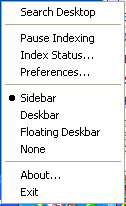
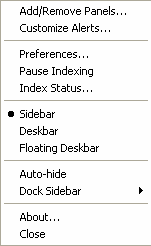
    • How you want the search box displayed (as part of the sidebar, as described above, or as a small box in your taskbar or a small floating box you can place anywhere on your desktop)

    Pictured below are the main options box (via the systray icon) and the sidebar preferences box respectively:

    google desktop search optionsgoogle desktop search preferences

    Strengths, weaknesses, and AdamWishes
    GD has some stark strengths and weaknesses when compared to some rather admirable competitors.

    STRENGTHS

    • Small footprint.
      Unlike other desktop search programs I’ve tried, GD never slows down my system… either in indexing or when conducting a search. 
    • Plugin architecture:
      Like the MSN Search Toolbar with Windows Desktop Search (whew! just MSNDS henceforth!), GD provides a framework where developers can create neat plugins that extend the functionality of and even improve the interface of the software.
    • Ability to search desktop and Webmail (well, at least Gmail) simultaneously:
      For those who maintain mail accounts both locally (e.g., on Outlook) and on Gmail, GD is the only offering that can search both simultaneously.
    • Enjoyable extras:
      Do we really need a mini photo slideshow along with tickers for news, weather, and other stuff? Not really. But, if even a mere guilty pleasure, it’s a treat having them all optionally stacked together in a well-behaved docked sidebar with GD. And the scratch pad is more useful than I initially suspected it would be. So, too, does the frequently-updating news component provide a greater amount of engaging information than I initially expected. Oh, and one particularly fun use I’ve found for the Hyper find-as-you-type feature: entering in the name of a song on the spur-of-the-moment, hitting [enter] and then (as it’s quickly loaded into my music player), hearing the song played. Much faster than loading up music software (winamp, wmp, whatever) and searching for the song there. 
    • Fast and comprehensive indexing:I’ve found GD to be among the fastest of the bunch to include files and e-mails, and — particularly with various plugins — it boasts a pretty comprehensive list of supported filetypes (though if memory serves me right, X1 may still take the prize in the comprehensiveness if not the speed area). 
    • Web historyThis is a biggie for me! I haven’t seen any other desktop search program that lets me not only pull up Web pages I’ve visited (via a full-text search!), but even keeps cached copies. Super-useful in research (what was that page I saw last week or the week before about new advances in speech recognition?…)

    WEAKNESSES

    • Search results narrowing by field:
      Here is where competitors like X1 and Copernic shine. Type a few letters of a mail recipient and then refine it with a few letters from the subject line. Boom! Or drill down by one of at least a dozen other useful fields as an extension of a general search. This, perhaps more than anything else, is the feature I still miss in GD.
    • Full-pane previews:
      While I appreciate GD’s snippets in the Web browser view, I sometimes yearn for the full-pane preview I grew accustomed to with competing products. 
    • Limited hits in find-as-you-type:
      While GD’s inclusion of “hyper” (the technology (?) that lets you display up to ten hits as you enter letter by letter of a search query) is quite valuable, it’s frustrating that it’s limited to a mere ten hits. Contrast this with the competitors seemingly almost-limitless view of as-you-type results. 
    • Lack of synchronization of panel extras:When you type a useful note in your scratchpad at home, you may find yourself surprised and miffed that it doesn’t show up on your GD panel on your work computer. Indeed, as far as I can tell, there’s no sharing of configurations or scratchpad data at all. You’ll need to set up your preferred stocks, weather, and other data bits on each installation, and that’s rather annoying. So, too, I’d assume, are “remove this” requests not synchronized from one installation to another, resulting in you dismissing those annoying whatsit Webclips on multiple computers. Since GD provides the option to log in to one’s Gmail account, it’s a pity that they didn’t (yet) go one step further and have initial and ongoing personalization efforts attached to one’s account and affect all of one’s GD installations.

    ADAMWISHES

    • More keyboardability!
      Once in the Hyper search box, I’d like to be able to to select numbers 0-9 to quickly select a search option, or letters A-whatever to select another option (search more, etc.). Heck, while we’re at it, why can’t I access items within a panel component (e.g., News) with a keyboard shortcut, too? 🙂 Incidentally, I’ve suggested the former UI idea to the Gmail team as well; on the pull-down options, why should I have to use my mouse? Why can’t they let me type the first letter of an option, e.g., R) Mark as read, S) Add Star and so on? But I digress. 
    • Filetype and field shortcut listing, please
      I know I can specify from: and to: and I think there’s type, but what other magic things can I modify use to narrow my searches with? Ah, okay, I just noticed some details here, but surely there must be more? Or there should be, I’d hope, for us powergeeks :-). 
    • More Outlook friendliness
      When I type Fred Smith in Hyper, one of the ten item listings should be his contact entry if one exists. And I’m still trying to figure out how I can look up a contact specifically (contact: [name] doesn’t work). Also, while I like having a search option with Outlook, it’s currently rather hobbled since the field listings aren’t flexible; noting a set of e-mails are from me doesn’t do much good if I can’t scan quickly who they’re to.

    * * *

    Okay, enough of my blathering. Now it’s your turn!
    – Have you tried GD? If so, what did you think? If not, are you going to try it?
    – What other desktop search programs have you tried? If you’ve also used GD, how do you think it compares?
    – What would you most like to see added to or improved in GD?
    – Got any GD questions?

    Oh, and here are some other cool sites talking about this latest GD version:

    Review by Nathan at InsideGoogle
    Search Engine Journal review

    EDITS:

    • 8/22: Changed references to Google Desktop Search to the correct name of Google Desktop (“GD”)