Category: technology

  • A brief update on my tablet PC experiences; a bit happier now

    Another day, a happier Adam.

    First of all, via the prompting of a thoughtful work friend yesterday afternon, I realized that I hadn’t installed a critical update on OneNote (SP1)… and installing that made a world of difference. No more wonky behavior of menus not coming up or the system getting stuck in select-mode, etc. Chris Pratley, one of the OneNote developers, also was kind enough to include a very thoughtful comment on my earlier blog entry, confirming that SP1 fixes a ton of stuff with OneNote and tablets (specifically for my brand of tablet, Toshiba).

    Either related to that update, or just my “training,” I’m finding that the tablet’s recognition of my handwriting is now excellent. Its recognition of my printing is only fair, but perhaps that’ll improve with time, too.

    Some questions about writing things:

    – I wonder if it’ll be confusing to the poor bugger if I switch back and forth between handwriting and printing.

    – I’m also unsure how to optimize my printing so as to get the greatest recognition results.

    – How can I consistently get small fonts? This seems easier with printing than with handwriting, but I’m not sure.

    Some other discoveries / thoughts:

    Writing the number “1” has so far been nearly impossible. Argh!

    For some reason, one of the Tablet Input Panels I have is to “recognize” words I type into the English UK dictionary. Huh? Why the UK dictionary? Was my tablet set up in the wrong language? How do I even check this? And what does that TIP option do anyway? Is it the same as “Add to dictionary”?

    I played “Spider Solitaire” which was both fun and (embarrassingly) hard even at the easiest level. One thing that made me annoyed and even a little uncomfortable, though, was the requirement that one literally drag stuff every move. Why couldn’t I simply tap on the origin and destination? That’d not only be a lot more efficient, but it’d also freak me out less about scratching my screen. Yes, I have a screen protector (looks crappy, but I haven’t yet bought a new / nicer one), but still…

    I know others have mentioned this angrily in many other places, but I’ll chime in: Toshiba, it’s a travesty how much crapware you’ve installed on this machine, both in terms of actual software and shortcuts. Three AOL links, two AT&T things, + Zinio, Franklin Covey, and other stuff, too. Sheesh! Throw in some more paper leaflets like credit card companies do, if you must, but please stop the practice of crapifying my tablet (unless you want to reduce the cost by $500 per tablet, in which case, sure, go ahead, make my day).

    On a happier note, this thing is kinda fun to use in bed. I read my blog feeds, checked out a few Web sites, played solitaire… wheee!

    And this tablet rarely has the fan go on and is also not very hot to the touch. That’s refreshing, especially compared to other laptops I’ve used!

    Oh, and I’m proud that so far, I’ve used this as a slate most of the time. The only time it has gotten to be a huge pain is when filling out registration forms. Oh yeah, and entering in the WEP key (twice!) to access my home wireless network. I cried uncle on that and used the keyboard.

    Frankly, I’m still not yet really sold on my purchase. I could have surfed bloglines in bed using a laptop, for instance. But the true test will be, I think, how this goes in a meeting… especially an upcoming meeting in which I’m taking notes about some Web site design and flow issues. Perhaps I’ll then use the keyboard, but keep the pen handy so I can make drawing notes on top of text (arrows, highlighting, etc.).

    I’ll keep y’all posted here. And thanks, everyone, for the thoughtful comments on my previous tablet entry!

  • First day with a tablet PC

    I just bought a used tablet PC (TPC) via eBay, and I’m not quite sure why. Guess it’s just the insatiably curious geek in me. I could have likely gotten a free laptop to use via work, but no, I had to try a tablet :-P.

    It’s a Toshiba M205, and here are a few of my initial thoughts after playing with it for an hour or two.

    This pen feels cheap, like a thicker version of the pens I used to use on those $1 write-on-peel-off “tablet” thingies my folks’d buy me from Sav-On when I was little.

    This screen is ugly with the protective cover thingy. Little bubbles, wrinkles, oh well. Doesn’t really hurt readability though.

    And speaking of readability, I was really worried that my old tired eyes wouldn’t be able to make out fonts on a 12 inch screen at ~1400×1000, but it’s not bad at all. Text looks decently sharp.

    Okay, now for the pen try-it demo thing. This damn thing doesn’t want to doubleclick! Ack. What’s the trick to this?!

    The Tablet Input Panel (TIP) just doesn’t seem very intuitive at all. It disappears if I float my pen a little too far away from the screen, which is way too easy to do. And there appear to be clickable shortcuts to www and .com, but they disappear as soon as I pen a letter?!

    Hmm… this thing (sort of) recognizes both printing and cursive. Kinda cool.

    Damn, not much battery life on this thing! 2-3 hours, tops? I guess I knew that, but gee, that’s a bummer. Good thing I got a spare battery.

    Okay, let’s play with OneNote. I already know this app from playing with it on my desktop. What the heck?! A measly 30 day trial? I thought this tablet came with a free license. That’s cheap.

    Anyway, let’s see how it is with a pen. Grrrr… not very good! First time, it seemed to get ‘stuck’ on a particular selection point. No matter what I did, it’d select text before and after a particular point. Had to close and restart the program. Other frustrations:

    – Bulleting with a pen is impossible. I’ve tried dashes. Little dots. Nothing gets interpreted as unordered lists. How dumb IS this thing?!

    – Why does it keep automatically switching back to pen? I want to stay in select mode!

    – I like how it suggests auto-correct-type words. Surprisingly good most of the time.

    – Why does it insist on creating separate blocks when I’m trying to just create a couple of paragraphs with a line space in between as one block?

    Grrr… so far, not off to a great start. And the paper docs are useless, too. Ridiculously general (don’t use the TPC in the bathtub kinda stuff). Maybe the manual-on-CD will give me a better jumpstart into the world of TPC’ing? I know I really should have thought about this before plunking down more than a grand, but why the heck did I buy a TPC anyway? I’m not an artist, nor do I want to be one. And maybe it’s just a steep learning curve, but so far it seems that I could take notes on a paper portfolio, then type them up manually on my desktop faster than I could clean up a handwritten OneNote page via my TPC.

    Or maybe I’m just too impatient.

    Hmm… okay, tomorrow I think I’ll try Evernote. It seems like a nifty program on my desktop and it has a very enthusiastic following with good support. And I guess I should install Office on this thing, along with the special Office Tablet extensions thingy.

    Ack, and then so much general-PC stuff to set up… Firefox+extensions, trillian, logmein, desktop search, some sort of synchronizing program and/or backup program, yahoo music engine, MyLifeOrganized, and lots more.

    Forgive me for being rather cranky tonight, but sometimes I can’t help but wonder whether owning a laptop will end up creating more work and headaches for me in the long run. Yeah, I’m a geek, but all this system prepping, learning, and maintenance stuff is just seeming daunting at the moment.

    * * *

    UPDATE:
    Some of the problems I complained about in this entry have been solved, largely by installing the OneNote SP1 update. See this more recent post for details.

  • A review of Google Talk: Not yet revolutionary or compelling

    As hyped in breathless news articles over the last few days, Google came out with their own IM (instant messaging) client this evening, Google Talk.

    VERDICT: Clean, uncluttered, intuitive, and rather unexciting in its current version.

    To be frank, I was (somewhat unfairly) disappointed with GTalk. Granted, it’s just v1 of a public beta, so I shouldn’t be so greedy, but… unlike with Gmail, I didn’t see anything that made me go WOW!

    Great voice quality? Sure, but Skype has already got that (and also already has a humungous userbase).

    Ad-free (at least for now)? Yes, but so is Trillian, the IM app I already use and love. Incidentally, the Pro version of Trillian (a very worthwhile buy, IMHO), along with other clients, can connect to the Google network. This is because Google is smartly and unselfishly running their chat service on the open source Jabber platform.

    And indeed, I’m having trouble seeing how Gtalk will gain traction for the time being. AIM, Yahoo, and MSN users really have little incentive to switch, especially since GTalk doesn’t (at least yet) interoperate with the big 3. Trillian users… I can’t see any reason why they’d switch, either. Skype folks? As noted above, I simply can’t forsee any defections.


    Let me sprinkle in a few positive notes, though:

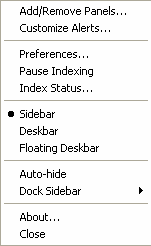
    You can run an ’embedded’ form of GTalk within the Google Desktop sidebar. Exit GD, wait a few moments, then restart it. Click the little down-arrow at the top right, select ADD/REMOVE PANELS, and check off Google Talk.

    Google Talk replaces the current Gmail Notifier, and that’s handy.

    GTalk scans your existing GMail address book, and lets you easily find and invite others to GTalk.

    Oh, and there’s a puzzling little easter egg in the About dialog box. Click on the ABOUT link in GTalk (or the sidebar component), and you’ll notice this in light text towards the bottom:

    play 23 21 13 16 21 19 . 7 1 13 5

    Anyone wanna guess what the significance of that is? 23, undoubtedly, stands for the 23rd of August — the release day, but the rest…? Maybe it’s something that, if you can solve it, you get a Google job offer? Get cracking! 😀


    Anyway, I’m guessing (and hoping) that Googlers have a trick or two up their sleeve with regards to this new product.

    What are your thoughts on this?

  • Google Desktop review — check out the cool new beta version!

    Introduction

    What is Google Desktop (“GD”)?
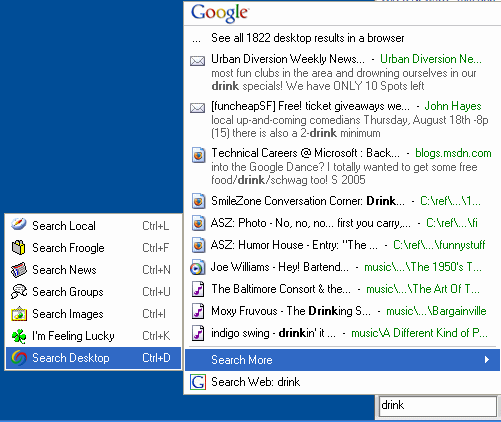
    Google Desktop (formerly known as Google Desktop Search or “GDS”) is free program from Google that enables you to search for data on your computer much like you use Google to search the Web. You can look for and open e-mails, photos, music files, PDFs, and lots of other good stuff. No ads are shown. Below you can see a screenshot of me searching for “drink.”

    google desktop search hyper results

    How to get GD

    Go to http://desktop.google.com/ and follow the very simple instructions. Note that you have a choice of the latest version (2.0 beta — a version still in testing, described in the rest of this post, or 1.0 final).

    A brief background on my love / not-so-love relationship with GD
    I had just about given up on GD. Initially impressed and pleased with the product, I was losing love for GD as I became more seduced by the find-as-you-type capability from competitors such as X1 and MSN Desktop Search. Sometime straying, I would somewhat grudgingly come back to GD, appreciative of the handy contextual Web snippets but wishing there was a product that combined the richness of this with find-as-you-type speediness.

    Just in time… Google Desktop Search v2 (GD2) is that charming fleet-footed if still a bit gawky new friend.

    For those too lazy or impatient to read through my entire review, I’ll summarize with this…
    Google Desktop offers a delightful mix of usefulness and fun. For those who have humungous amounts of data and need to finely drill down by multiple fields, X1 and Copernic may remain more favorable options. But for the vast majority of geeks and non-geeks alike, GD’s speed, light footprint, and currently-entertaining-if-not-yet-essential non-search extras will likely be enough to earn a place on their desktop.

    Key improvements

    GD2 is a significant step above GDS. Here’s a sampling of what’s new and improved:

    • Find-as-you-type (search results quickly pop up as you type each letter, narrowing the search with each additional letter)
    • Search Gmail and network drives.
    • Search Outlook items like tasks, notes, appointments. Search directly from the Outlook interface, too.
    • A nifty sidebar (discussed in detail below) with an open API!
    • Items moved (even from an IMAP to non-IMAP folder) are now handled more effectively by GD.

    Installation and pre-installation

    Installation of GD is easy and pretty painless. On my reasonably beefy P4, the download took a few seconds and the entire install process took under 3 minutes. This, of course, doesn’t include indexing time, which (though I didn’t time it) seemed only a few hours for my drive with 100+ megs of stuff AND my Gmail account.

    Google’s GD privacy policy, thankfully written in English rather than legalese, is similarly straightforward. Highlights:

    • The contents of your computer aren’t shared with Google or other folks without your explicit permission.
    • A limited amount of non-personal info is sent to Google to help in troubleshooting, software development, and content personalization. You can opt out of this if you want.
    • You have control over what GD indexes.
    • You can uninstall GD if you like (duh!).

    Google walks you through some basic configuration options and then, voila, you’re done. Well, almost done. You have to go read a book, ride a bike, or do something away from your computer (ack!) for a while if you want Google to actually index your stuff. And hey, make sure your (supported) e-mail program is open in the meantime, or GD won’t be able to index your mail.

    The nifty GD Sidebar

    The sidebar consists of the following components, any of which may be either not shown or minimized. Items in green are ones I personally find particularly cool.

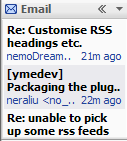
    • Email
      This only supports Gmail for now. It shows a bit of each recent email’s title, AUTHOR, and time of receipt ([x] minutes ago).
    • News
      This shows a number (your choice) of headlines from Google News… article title, source, and time of posting ([x] minutes ago). This is very frequently updated and you can actually see new items gradually push down older items in a nice gradual sliding effect (which I suppose some could find distracting).
    • Web Clips
      This presents “feeds” to you either from sites you’ve frequently visited and/or from sites you specify. For instance, after I visited Wired.com, this sidebar component started including headlines from Wired. When I visited a friend’s blog, it started including headlines from her blog. You get the idea.
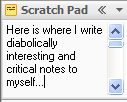
    • Scratch Pad
      Pretty much like what it sounds like. Write plain-text notes here and they’ll stay here :-).
    • Photos
      GD crawls through your photo collection (which you can bound by specific limits) and displays a mini-slideshow here… a new photo fades in every 15 seconds by default. Clicking on the photo takes you to a list of recently shown photos. Clicking on one of those photos brings up the full-sized version. In addition to grabbing photos from your hard drive, this panel item also optionally shows photos from sites you visit.
    • What’s Hot
      I’m not exactly sure how this works, but it seems like some sort of Zeitgeist / Blogpulse type of thing highlighting the Web pages that have recently been popular. I find the stuff on www.spurl.net to be more comprehensive and entertaining.
    • Quick View
      This panel item lists items or pages you’ve recently accessed or viewed. Sounds great in theory, but I’ve found it pretty useless in practice, since it tends to show files that my computer accesses frequently (preference files, etc.), or files that I regularly — but indirectly — access on the ‘net.
    • Stocks
      Add stocks or stock indices, see the numbers. Pretty basic.
    • Weather
      Add a city, see the highs, lows, and so on. Pulls from the same weather data you see if you type weather [zipcode] into Google… that is to say, not terribly accurate data, IMHO.

    Information from each sidebar can also be viewed in a larger panel; for instance, you can click on the << mark on the title bar of News, and you'll get a larger (attached) window showing news items. Click on one of those news items and you'll see a snippet. Click on the title in the snippet, and you'll be brought to the original Web page. Whew! Sounds complicated, but it's all rather intuitive. You can also easily drag-and-drop resize, and minimize sidebar components. Most importantly, I see this sidebar as just a glimpse of stuff to come. I have no doubt that people will create and share their own useful or fun sidebar items via GD plugins pretty quickly, especially given that the sidebar — as GD on the whole — has an API that independent developers can write for.

    Google Desktop Search stocks sidebar Google Desktop Search email sidebar Google Desktop Search photos sidebar Google Desktop Search scratch pad sidebar
    Google Desktop Search quick view sidebar Google Desktop Search news sidebar Google Desktop Search web clips sidebar Google Desktop Search weather sidebar

    Google Desktop Search news sidebar expanded

    Configurability and options
    GD is reasonably configurable. You can set, among other things…

    • What types of data you want indexed (email, chats, Web history, etc.)
    • Your Gmail signin info (so GD can search your Gmail)
    • Additional hard drives and network drives to search
    • Web sites and hard drive directories to exclude from searching
    • Encrypt or not-encrypt for the GD database (default is unencrypted… better speed!)
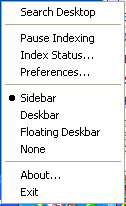
    • How you want the search box displayed (as part of the sidebar, as described above, or as a small box in your taskbar or a small floating box you can place anywhere on your desktop)

    Pictured below are the main options box (via the systray icon) and the sidebar preferences box respectively:

    google desktop search optionsgoogle desktop search preferences

    Strengths, weaknesses, and AdamWishes
    GD has some stark strengths and weaknesses when compared to some rather admirable competitors.

    STRENGTHS

    • Small footprint.
      Unlike other desktop search programs I’ve tried, GD never slows down my system… either in indexing or when conducting a search. 
    • Plugin architecture:
      Like the MSN Search Toolbar with Windows Desktop Search (whew! just MSNDS henceforth!), GD provides a framework where developers can create neat plugins that extend the functionality of and even improve the interface of the software.
    • Ability to search desktop and Webmail (well, at least Gmail) simultaneously:
      For those who maintain mail accounts both locally (e.g., on Outlook) and on Gmail, GD is the only offering that can search both simultaneously.
    • Enjoyable extras:
      Do we really need a mini photo slideshow along with tickers for news, weather, and other stuff? Not really. But, if even a mere guilty pleasure, it’s a treat having them all optionally stacked together in a well-behaved docked sidebar with GD. And the scratch pad is more useful than I initially suspected it would be. So, too, does the frequently-updating news component provide a greater amount of engaging information than I initially expected. Oh, and one particularly fun use I’ve found for the Hyper find-as-you-type feature: entering in the name of a song on the spur-of-the-moment, hitting [enter] and then (as it’s quickly loaded into my music player), hearing the song played. Much faster than loading up music software (winamp, wmp, whatever) and searching for the song there. 
    • Fast and comprehensive indexing:I’ve found GD to be among the fastest of the bunch to include files and e-mails, and — particularly with various plugins — it boasts a pretty comprehensive list of supported filetypes (though if memory serves me right, X1 may still take the prize in the comprehensiveness if not the speed area). 
    • Web historyThis is a biggie for me! I haven’t seen any other desktop search program that lets me not only pull up Web pages I’ve visited (via a full-text search!), but even keeps cached copies. Super-useful in research (what was that page I saw last week or the week before about new advances in speech recognition?…)

    WEAKNESSES

    • Search results narrowing by field:
      Here is where competitors like X1 and Copernic shine. Type a few letters of a mail recipient and then refine it with a few letters from the subject line. Boom! Or drill down by one of at least a dozen other useful fields as an extension of a general search. This, perhaps more than anything else, is the feature I still miss in GD.
    • Full-pane previews:
      While I appreciate GD’s snippets in the Web browser view, I sometimes yearn for the full-pane preview I grew accustomed to with competing products. 
    • Limited hits in find-as-you-type:
      While GD’s inclusion of “hyper” (the technology (?) that lets you display up to ten hits as you enter letter by letter of a search query) is quite valuable, it’s frustrating that it’s limited to a mere ten hits. Contrast this with the competitors seemingly almost-limitless view of as-you-type results. 
    • Lack of synchronization of panel extras:When you type a useful note in your scratchpad at home, you may find yourself surprised and miffed that it doesn’t show up on your GD panel on your work computer. Indeed, as far as I can tell, there’s no sharing of configurations or scratchpad data at all. You’ll need to set up your preferred stocks, weather, and other data bits on each installation, and that’s rather annoying. So, too, I’d assume, are “remove this” requests not synchronized from one installation to another, resulting in you dismissing those annoying whatsit Webclips on multiple computers. Since GD provides the option to log in to one’s Gmail account, it’s a pity that they didn’t (yet) go one step further and have initial and ongoing personalization efforts attached to one’s account and affect all of one’s GD installations.

    ADAMWISHES

    • More keyboardability!
      Once in the Hyper search box, I’d like to be able to to select numbers 0-9 to quickly select a search option, or letters A-whatever to select another option (search more, etc.). Heck, while we’re at it, why can’t I access items within a panel component (e.g., News) with a keyboard shortcut, too? 🙂 Incidentally, I’ve suggested the former UI idea to the Gmail team as well; on the pull-down options, why should I have to use my mouse? Why can’t they let me type the first letter of an option, e.g., R) Mark as read, S) Add Star and so on? But I digress. 
    • Filetype and field shortcut listing, please
      I know I can specify from: and to: and I think there’s type, but what other magic things can I modify use to narrow my searches with? Ah, okay, I just noticed some details here, but surely there must be more? Or there should be, I’d hope, for us powergeeks :-). 
    • More Outlook friendliness
      When I type Fred Smith in Hyper, one of the ten item listings should be his contact entry if one exists. And I’m still trying to figure out how I can look up a contact specifically (contact: [name] doesn’t work). Also, while I like having a search option with Outlook, it’s currently rather hobbled since the field listings aren’t flexible; noting a set of e-mails are from me doesn’t do much good if I can’t scan quickly who they’re to.

    * * *

    Okay, enough of my blathering. Now it’s your turn!
    – Have you tried GD? If so, what did you think? If not, are you going to try it?
    – What other desktop search programs have you tried? If you’ve also used GD, how do you think it compares?
    – What would you most like to see added to or improved in GD?
    – Got any GD questions?

    Oh, and here are some other cool sites talking about this latest GD version:

    Review by Nathan at InsideGoogle
    Search Engine Journal review

    EDITS:

    • 8/22: Changed references to Google Desktop Search to the correct name of Google Desktop (“GD”)
  • Blogger DON’Ts (how to gain admirers, get money, stay employed, etc.)

    I just came back from a blogger meetup, and am for some (possibly related) reason inspired to offer some blogging tips I’ve accumulated over the nearly three years I’ve been blogging.

    0) THE SHORT VERSION FOR IMPATIENT FOLKS
    – When in doubt, save-as-draft.
    – Write about what you love.
    – Publicize smartly.
    – Add your blog to directories.
    – Write smart blog titles and excerpts.
    – Put ads in your blog unapologetically.
    – Make sure you’re pinging everyone.
    – Use SE-friendly URLs.
    – Make your contact info visible.
    – Test your blog in different browsers.
    – Ask your friends for blunt advice.
    – Don’t lose perspective.
    – Ask me out (females only, please)

    * * *

    1) DON’T BE STUPID
    This is key point #1, literally. While it’s actually a superb idea to write when you’re really angry or depressed or lovestruck or feeling very emotional in general, it’s not smart to actually publish your entries without a cooling off period. Being first or speedy (e.g., impulsive) is not as valuable as being safe long term. Remember, what you post on your blog will likely last forever, even after you edit or delete it (in the Wayback Machine, Google cache, peoples’ offline aggregators, etc.).

    So, in other words, write when you are inspired but take yourself through this quick decision tree first:

    Would I feel comfortable having my Mom, my friends, my current or future significant other, and my current and future work colleagues read this?

    – [YES]: Are you sure?
    – – [YES, DANGIT!]: Okay, hit publish [end]
    – – [UM, NOT TOTALLY]: Hit save as draft. Revisit tomorrow [end]
    – [NO]: Hit save as draft. Revisit tomorrow. [end]

    2) DON’T FAKE IT
    If you don’t feel passionate about what you’re blogging, it will show. Just because you figure you can make one MILLION dollars writing about texas hold’em poker doesn’t mean that you’ll be successful in doing so (unless you really, really love texas hold’em, and — really, now — is that whole shebang truly anything more than media hype and blog-comment-spam-insanity anyway? Does anyone REALLY play that game? Ah, but I digress.)

    3) DON’T BE SHY
    If you’re proud of your blog (and dammit, you should be!), include a link to it in your e-mail signature, print up business cards (Vistaprint is hella cheap and makes good stuff), and mention your blog with your name when post on other blogs, write notes on forums, etc. But (and, obviously, this SHOULD go without saying), don’t be a twit about it. Offer thoughtful or at least entertaining contributions instead of merely hyping your blog, and people WILL go see your blog because they like you and/or your writing, not because you screamed “Look at my blog!!!!!!!1”

    And while we’re talking about publicity stuff, let me offer some key (actually specific) tips about how to increase your readership and generally extend the reach of your blog:

    Use Feedburner
    This service is free (except for their few Pro features) and really rocks. It’ll help make your RSS feeds flexible, enable you to create an animated GIF with your latest headlines, and much more!

    – Add your blog to relevant directories.
    (sorry, I haven’t kept a list of these lately, but I’m sure you can google this, and of course, I welcome input here, too!)

    – Intelligently and cleverly write both your blog entry titles AND excerpts.
    Include relevant keywords, a teaser, AND an honest description all in one whenever possible.

    – Make your feeds easy to find!
    As an example, look at my autodiscovery meta tags (view | source of my blog), and note how I advertise my feeds right up at the top of every page of my blog.

    4) DON’T FEEL GUILTY ABOUT $$$ (or even just $)
    Okay, so I’m a sell-out. And frankly, I think I probably have one too many ad blocks in my blog now (the whole blog is due for a redesign, honest-to-God, though I know I’ve been sincerely noting that for like five months now [sigh]). But with that said, I am completely unashamed that I have ads in my blog. I pay for hosting. I spend time offering (IMHO) oft-useful or at least amusing comments to 500-1000 folks each day. Putting Google’s AdSense ads on my site doesn’t make what I have to say any less interesting or valid (and, admittedly, doesn’t make it any MORE interesting, either). Oh, and in case you’re curious, I make about $2 a day. I’m not getting rich, and since I spend at least two hours on my blog a week, this means I make a mere $7/hour or so. But hey, $700 a year is still nothing to sneeze at :-).

    Bottom line: Don’t blog for money, but don’t feel guilty about earning a bagel (with schmear) a day for your writing, either.

    5) DON’T FORGET THE WHORISH UNDERPINNINGS

    Ping, ping, baby!
    Are you pinging everyone you should ping? Here’s my ping list, and I think it’s pretty complete:

    http://rpc.pingomatic.com/
    http://rpc.blogrolling.com/pinger/
    http://rpc.technorati.com/rpc/ping
    http://api.my.yahoo.com/RPC2
    http://ping.feedburner.com
    http://api.moreover.com/RPC2

    Make your individual blog entry URLs search-engine friendly!
    I haven’t yet had a chance to do this with my blog yet, but ideally, your entry about playful albino dolphins should be at http://www.yourblog.com/archives/playful-albino-dolphins

    Hyphens are better than underscores.
    Don’t just trust me… I read it from GoogleGuy so it must be true (really).

    6) DON’T OVERLOOK THE BASICS!

    – Make it easy to contact you!
    I can’t tell you how many times I wanted to send a note to a blogger (to offer a tip or just congrats, to let them know one of their links is broken, etc.), and I was unable to find any way to reach them via e-mail. That’s just stupid. If you’re worried about spambots (which is understandable!), include a “Contact me” form, or obfuscate your address (e.g., “write me at adam at the domain lasnik.net”).

    Make sure your site works in ALL popular browsers!
    If you’re on a PC, you should be using Firefox instead of IE anyway, but look at your blog in both no matter what. I discovered that a friend’s blog, for instance, was completely unreadable in Firefox due to incompatible CSS. Not a very good way to build up readership! On the other hand, quit worrying about Netscape 4.7 folks. Sorry, people, but you’re <1% of visitors now and no one other than masochists or stupid people will bother to specially-optimize / cripple their sites for you. – Ask your friends for honest advice.
    For instance, 9 out of 10 AdamFriends have unequivocably complained that my blog is too cluttered and has a lousy color scheme. Frankly, I think they’re all nuts (well, except for the one suck-up who says my site is perfect :D). But clearly I’m outvoted. The only reason I’ve not yet cleaned up my blog is that I’m insanely busy with stuff that actually pays me more than $7/hr, delightfully entertains me, gets me laid, and/or all of the above. Hmm… that was actually more than one reason, I suppose, but oh well.

    7) DON’T LOSE PERSPECTIVE!
    I keep seeing bloggers apologize for going on hiatus. Heck, even I’ve been guilty of groveling to my readers, begging them to still love me even when I go weeks months without blogging.

    What a crock of bovine excrement. We have no obligations to our readers. I’m serious. Friends are more important than blogging. Family is more important than blogging. Exercise, diet, inner peace, world peace, and steady employment — more important than blogging. Going on a hike somewhere without your laptop or PDA and getting fresh, un-recirculated air — more important than blogging. And here’s a crazy idea: going on a vacation for a week and actually avoiding blogs, online and offline news (including TV, newspapers, etc.), and everything digital — way more important than blogging.

    I know, I know, I may sound like a hypocritical smarmy twit about all of this, but I really mean all of it. The week I spent in Port Townsend unplugged and at a camp for swingers made me far happier than any week in which I’ve gotten lots of blog traffic or broke $3/day from blogvertising.

    Sometimes we just need to take a step back and put everything in perspective.

    For the other 355 days, though, I hope my blog tips are helpful :-D. Please feel free to ask me for any clarifications (“What’s a ping, daddy?”), offer suggestions, or simply tell me I’m full of crap.

    Or, if you’re a really cute and artistic female who likes geeks, ask me out. That’s better than blogging, too :-).
  • Google can’t count! Here’s proof.

    That ?ber-smart search engine that whips through a bazillion pages faster than a speeding bullet… surely it can do something as simple as count, right?

    Yes and no. While Google could undoubtedly out-count the best of ’em, it chooses not to in order to speed up its searches. That’s the word from a senior Googler to whom I posed this puzzle.

    In short, Google was telling me it found [x] hits for the quoted string “Adam Lasnik”… and a number significantly smaller than [x] for the shorter string “Adam” — an unintuitive and clearly wrong calculation.

    I actually stumped several Googlers, who kindly ushered me up the chain to a Senior Googler. Even he wasn’t certain what was going on, so he promised to get back with me… and he did.

    The situation was caused by “an anomaly in our results estimation process that should go away in future releases.” And indeed, as you can see now from comparing the search results, either the problem has been solved or that Googler slyly did a bandaid fix on my name :D.

    * * *

    But Google’s aversion to counting is still evidenced in other areas.

    Check out these screenshots from a Google Desktop search on my machine for the (literal) string “sample.”


    “In this case, the number of results displayed is only an estimate” admitted one of the Desktop Googlers. Indeed ;-). But wouldn’t it make more sense for Google to say “>100, >1000, >10,000” etc.?

    When you get right down to it, Google’s like those overarchieving kids who are capable of doing all the mundane tasks of life we’re all expected to tackle… but prefer not to. They have better things to do. So they lie to those in charge and say, “Uh, yeah, sure… I counted 837” when, in fact, they just looked at the student council ballots and made a smart guess based on the thickness of the stack and the average dimensions of the balloting paper.

    Come to think of it, it’s probably those very kids who are running around creating kickass-albeit-counting-challenged things at the Googleplex, eh?

  • When smart companies do dumb things

    Heard the big announcement about Yahoo’s new music service?

    Check it out at (the logical) http://yahoo.com/music/

    Interested in being a publisher with Google’s AdSense (partner to the AdWords program which accounts for >90% of the company’s revenue)? Try http://adsense.google.com/ (which would match adwords.google.com and labs.google.com, etc.)

    What, those URLs don’t work? They don’t even *forward* to the appropriate page?

    My point exactly.

    Is it just me, or is that incredibly, massively dumb?

    P.S. — The correct URLs are http://music.yahoo.com/ and http://google.com/adsense

  • Otunica — Independent music via Google, Yahoo!, or Amazon

    THE PURPOSE OF OTUNICA

    Encouraging and facilitating the annotation, sharing, and discovery of independent music

    WHAT WILL OTUNICA CONTAIN?

    • People will be able to upload any music that they have created OR have the permission to distribute.
    • Otunica will also index all music content on the Web tagged with applicable Creative Commons permissions.

    WHAT FEATURES WILL IT OFFER?

    • Sophisticated searching
      Members will be able to search by artist, track title, style, key(s) (C# minor, F major…), beats-per-minute (“BPM”) ranges, dynamic contrast, meter (waltz, 5/4, 4/4), and more… gleaned both from composer-supplied metadata and automatic detection mechanisms. I know that, at the very least, programs exist today that are — if not altogether reliably — able to discern BPM and music keys, so the technology is already at least partly there. Additionally, I envision a Flickr-style tagging feature whereby both the original content creators and (optionally) their trusted friends or representatives can add descriptive and obviously searchable tags to tunes (“Piano,” “Hard-driving,” “Melancholy”…)
    • Easy sharing
      Members will be able to easily send links to streams or downloads of their favorite tunes (or playlists of tunes) to friends… perhaps directly via Gmail or Yahoo! Mail.
    • Multi-faceted discovery
      Via composer-supplied and automatically determined metadata, Otunica will identify highly similar tunes (“The following songs are very close-matches to [the current song]”), point out slight variants (“Find similar but higher-tempo songs,” “Find similar songs but in [x] meter…”), and also present collaboratively-filtered recommendations (“Members who streamed/downloaded this song also streamed or downloaded these songs.”)
    • OGG music format
      Given the recent frustrations with DRM’d and proprietary music formats, a powerful company like Google, Yahoo!, or Amazon could substantially improve the survival and even mass-adoption chances of an open source format like OGG… not only avoiding controversial solutions such as WMA and Fairplay’d AAC, but also bypassing MP3 licensing fees.

    WHY IS OTUNICA IMPORTANT TO THE FUTURE OF MUSIC?

    • It will offer in-depth exposure for independent artists
      It will provide, for the first time, a depository of independently created music that will be accessible, affordable, and both usefully and enticingly presented to encourage true sharing and discovery.
    • It will present a viable alternative to shackled “big music”
      Otunica will enable DJs, wedding planners, movie-makers, performers, and others in need of specific types of music to easily find what they need and then both affordably and legally gain the access to use it. No need to fret over confusing and byzantine licensing fees for distribution, performance, etc.
    • It will stimulate the creation of really cool new art
      As Law professor and Creative Commons guy Lawrence Lessig has noted (dang, I really need to blog the notes I took at one of his recent fab lectures!), one of the largest and most frustrating impediments to the creation of innovative art is the crippling state of intellectual property laws today. I’d add that, even with so many new songs being added to the Web nowadays with Creative Commons licenses, it’s still practically impossible for artists to find a particular type of song they’d like to work with (e.g., ska in a minor key with a BPM of 160 or greater)

    HOW WILL OTUNICA MAKE MONEY?

    • Purchases:
      Via purchase options (for a CD, uncompressed download, and/or extended performance/redistribution rights) to music, with most of the cash going to the artist and a cut going to Otunica
    • Tips:
      A virtual tip jar; members who like particular tunes will be able to make micropayments to artists, and — again — Otunica will take a cut. I expect that Otunica’s percentage will be substantially more artist-friendly than iTunes, Amazon.com, or even the already-rather-artist-friendly CDBaby.
    • Ads:
      Contextual and/or thematic ads (CD media, speakers, recording equipment…)

    WHAT ABOUT COPYRIGHT VIOLATIONS?

    Technology exists today that should fairly easily be able to identify clear infringements via a combination of aural and other fingerprinting and metadata. Community self-policing would also be likely effective (e.g., on Flickr, spammers and people posting photos that clearly violate the service’s rules are identified and seemingly dealt with quickly).

    And it will be made effectively clear from the start that Otunica isn’t the place to share or get Britney Spears’ latest junk.

    WHO WILL BUILD OTUNICA?

    Google — Why

    • Already getting into the (related multimedia) video space in at least three different ways
    • Google has already been indexing many other forms of information… images, books, various document formats (PDF, .doc), and — of course — Web pages… and could learn a lot about indexing multimedia from the project of Otunica.
    • Google has posteriorloads of space and bandwidth and is acquiring more all the time.

    Google — What Otunica could integrate with

    • Maps (see the location of fellow artists who fit certain criteria so you could jam in person…)
    • Groups (mailing lists on particular styles, fan lists for certain artists, etc.)
    • Mail (one-click send of stream/download links)
    • Answers (set a price on a particular composition, and have artists bid to create the piece for you)
    • Blogger (drag-and-drop a snippet of a piece onto a blog entry)

    Yahoo! — Why

    • Already an established (albeit currently small) community memberbase and structure with Yahoo! 360
    • Also, from recent acquisition, a hugely dedicated memberbase in Flickr
    • And of course, a humungous general userbase, complete with already-established sign-ins, cross-referenceable demographic information and preference settings, etc.
    • Experience with groups via Yahoo! Groups
    • Experience with multimedia via Yahoo! Photos and Launchcast

    Yahoo! — What Otunica could integrate with

    • Launchcast
    • 360 (network with other artists, include snippets of a song in your blog…)
    • Mail
    • Groups
    • Recently-acquired Musicmatch (useful for preparation, uploading, browsing, sharing, etc.)
    • Flickr (though this would seem tenuous at present, IMHO)
    • IM (great way to share streams!)

    Amazon — Why

    • A substantial userbase
    • Strong recommendation engine, coupled with a ratings system, already in place
    • Tie-ins with ‘established’ media (Members who liked Sting also enjoyed [independent artist] or visa-versa)
    • Payment processing and distribution strengths (“Buy a CD of [independent artist’s music] with one click!”)
    • May offer good synergy with Amazon.com’s upcoming social networking service / feature set (how do I know this is coming up? I saw an Amazon.com job requsition for social-networking experts)

    Amazon — What Otunica could integrate with
    I must admit, I’m at a bit of a loss on this one. Please share your thoughts in the comments section below!

    In general — why not

    • Possibly very expensive proposition (bandwidth, storage, actual staffing for monitoring, etc.)
    • Potential threat of rabid opposition from ‘professional’ content creators and management organizations, such as mainstream artists and record labels (particularly a worry for those with established relationships with these players, such as Amazon and Yahoo!)
    • Music sharing and discovery has, at least at the elemental level, already been done (mp3.cnet.com, mp3.com before that, etc.)

    WHY NOT THESE COMPANIES…?

    • Apple
      Too tied-at-the-hip with the major labels, not a search company, lacks the substantial bandwidth and storage capabilities of the major search engines.
    • Microsoft
      MS is a “me too” company, not an innovator, and I don’t mean that in a pejorative sense. Overture and Google came out with paid search, now Microsoft is entering it. Nintendo –> Xbox. You get the idea (though I admit, I am slightly exaggerating the “me too” aspect to get a rise or at least a comment out of endearingly prolific Microsoft blogger Robert Scoble :D). Also, like Apple, Microsoft is too closely aligned with the major labels and has its own property, MSN music, which might present a conflict of interest (or, playing devil’s advocate, a cross-linking opportunity).

    SKILLSETS OF THE PEOPLE NEEDED TO ESTABLISH AND WORK ON OTUNICA

    • Musical abilities! (performer, composer)
    • Related management strengths (band manager, entertainment-related product manager, etc.)
    • Programming chops
    • UI design talents
    • Mad QA skillz
    • Online community planning and design
    • Online community moderation experience / patience of a saint
    • Social science smarts / social network structural and policy design knowledge

    * * *

    – Who will create Otunica? A major (or even minor) entity I’ve not identified?
    – What are some of the features I have overlooked?
    – How about the values to the world of music? Any I’ve missed? Or is this just a pie-in-the-sky utopia?
    – Particular implementation challenges?

    What do you think of the whole idea in general? Please add a comment below 🙂

    (and hey, Google, Yahoo!, and Amazon.com people — please forward this entry to people at your company who can make Otunica happen! As a musician, Lindy Hopper, and budding jack-of-many-dances, I would be incredibly overjoyed to see something like this come to fruition!!!)

  • A wonderful Google quote from Danny Sullivan

    “Yahoo says, ‘Where is the mountain? Let’s climb it,”‘ Sullivan said. “Google says, ‘Maybe we want to go up the mountain, and maybe we want to go surfing.”‘

    – Search Engine Meister Danny Sullivan, quoted by Saul Hansell in this New York Times article

    IMHO, there’s something to be said about both approaches and attitudes. And personally, I know a mix of hardworking and fun-loving people at both companies.

    How’s that for non-commital? 😀

  • Feed Fabulosity (Atom, RSS, Full, Summary… oh boy!)

    I’m at least temporarily offering both summary full feeds via FeedBurner… which delivers Atom, RSS, whatever your newsreader likes :-). Just look on over at the lefthand-side of any BLADAM page for the links.

    Since I do like people to actually visit my site, however (for both selfish and unselfish reasons) I’m debating on whether to keep the full feed or perhaps just run with the summary feed in a bit.

    If you have any strong opinions — heck, ANY opinions (:cough: comment whore :cough:) — please speak below or forever hold your peace.

    Or is it piece. I never did figure that out…

    Argh. Blasted late night foggy ramblings 😉